
Hyundai Venue (QX): Smart Key / Unlocking your vehicle
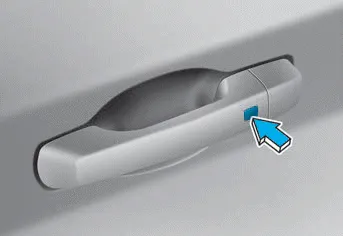
To unlock your vehicle:
1. Make sure you have the smart key in your possession.
2. Press either the button on the door handle or the Door Unock button (2) on the smart key. The driver’s door will unlock and the hazard warning lights will blink two times.
3. Two Press Unlock Feature
The priority for unlocking the driver door only, or unlocking all the doors with one press may be adjusted in the User Settings menu in the LCD cluster display.
The Two Press Unlock feature, when enabled, will require the user to press the door unlock button once for driver door only and twice for unlocking all the doors.
Select or Deselect the Two Press Unlock Feature in the User Settings menu in the LCD cluster display. The option can be found under the following menu:
USER SETTINGS → DOOR → TWO PRESS UNLOCK
Information
- The door handle buttons will only operate when the smart key is within 28-40 inches (0.7~1m) from the outside door handle
- Either the driver or front passenger door can be opened with the door handle button when the smart key is within this range
- If you press the front passenger outside door handle with the smart key in you
To lock your vehicle using the door handle button or the Smart Key: 1. Close all doors, hood and liftgate. 2. Either press the door handle button or press the Door Lock button (1) on the smart key.
You can start the engine and turn on the climate system by pressing the remote start button (3) outside the vehicle. To start and stop engine remotely: 1.
Other information:
Hyundai Venue (QX) (2020-2026) Service Manual: Ambient Temperature Sensor. Description and operation
Description The ambient temperature sensor is located at the front of the condenser and detects ambient air temperature. It is a negative type thermistor; resistance will increase with lower temperature, and decrease with higher temperature.
Hyundai Venue (QX) (2020-2026) Service Manual: Description and operation
Categories
- Manuals Home
- Hyundai Venue Owners Manual
- Hyundai Venue Service Manual
- Safety System
- Rear Seat Assembly. Repair procedures
- Emission Control System
- New on site
- Most important about car
