
Hyundai Venue (QX): Interior Features / Cargo Area Cover
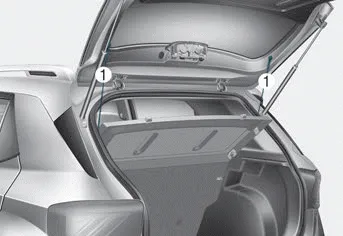
Use the cover to hide items stored in the cargo area. The cargo area cover will lift when the liftgate is opened. Disconnect the strap (1) from the holder if you want to return the cover to the original position. To remove the cargo area cover completely, pull the cover backward and out from the rail. To secure a wider space, pull the cargo area cover backward slightly and push down it.
NOTICE
Since the cargo area cover may be damaged or deformed, do not put luggage on it when it is being used.
WARNING
- Do not place objects on the cargo area cover while driving. Such objects may be thrown about inside the vehicle and possibly injure vehicle occupants during an accident or when braking.
- Never allow anyone to ride in the luggage compartment. It is designed for luggage only.
- Maintain balance of the vehicle and locate the weight as far forward as possible.
To keep items from shifting in the luggage compartment, you can use the 4 holders located in the luggage board to attach the luggage net. Make sure the luggage net is securely attached to the holders in the luggage board.
Roof Side Rails If your vehicle comes equipped with roof side rails, then roof side rails crossbars can be installed on top of your vehicle. The roof side rails crossbars are an accessory and are available at your local HYUNDAI dealer.
Other information:
Hyundai Venue (QX) (2020-2026) Service Manual: Blower Unit. Components and components location
Component Location 1. Blower unit assembly Component Location 1. Intake seal 2. Intake upper case 3. Intake actuator 4. Intake door 5. Intake lower case 6. Blower pad 7.
Hyundai Venue (QX) (2020-2026) Service Manual: Description and operation
Description The cruise control system is engaged by the cruise "ON/OFF" main switch located on right of steering wheel column. The system has the capability to cruise, coast, accelerate and resume speed. It also has a safety interrupt, engaged upon depressing brake or shifting select lever.
Categories
- Manuals Home
- Hyundai Venue Owners Manual
- Hyundai Venue Service Manual
- Tire Pressure Monitoring System (TPMS) (Type A)
- Engine Mechanical System
- Battery. Specifications
- New on site
- Most important about car
