
Hyundai Venue (QX): Interior Features / Luggage Net Holder
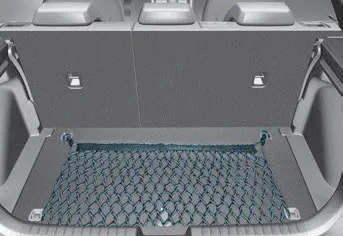
To keep items from shifting in the luggage compartment, you can use the 4 holders located in the luggage board to attach the luggage net.
Make sure the luggage net is securely attached to the holders in the luggage board.
WARNING
Avoid eye injury. DO NOT overstretch the luggage net. ALWAYS keep your face and body out of the luggage net’s recoil path. DO NOT use the luggage net when the strap has visible signs of wear or damage.
Use the luggage net to keep only light items from shifting in the luggage compartment.
ALWAYS use the Floor Mat Anchors to attach the front floor mats to the vehicle. The anchors on the front floor carpet keep the floor mats from sliding forward.
Use the cover to hide items stored in the cargo area. The cargo area cover will lift when the liftgate is opened. Disconnect the strap (1) from the holder if you want to return the cover to the original position.
Other information:
Hyundai Venue (QX) (2020-2026) Service Manual: General safety information and caution
Instructions (R-134a) When Handling Refrigerant 1. R-134a liquid refrigerant is highly volatile. A drop on the skin of your hand could result in localized frostbite. When handling the refrigerant, be sure to wear gloves.
Hyundai Venue (QX) (2020-2026) Service Manual: Evaporator Temperature Sensor. Description and operation
Categories
- Manuals Home
- Hyundai Venue Owners Manual
- Hyundai Venue Service Manual
- Repair procedures
- General Information
- Child-Protector Rear Door Locks
- New on site
- Most important about car
