
Hyundai Venue (QX): Instrument Cluster / Instrument Cluster Control
Adjusting instrument cluster illumination
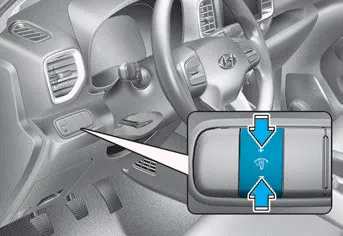
When the vehicle's parking lamps or headlamps are on, press the illumination control button to adjust the brightness of the instrument panel illumination.
When pressing the illumination control button, the interior switch illumination intensity is also adjustable.
WARNING
Never adjust the instrument cluster while driving. Doing so could lead to driver distraction which may cause an accident and lead to vehicle damage, serious injury, or death.
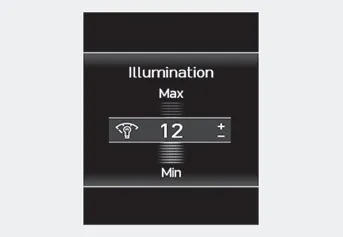
- The brightness of the instrument panel illumination is displayed.
- If the brightness reaches the maximum or minimum level, a chime will sound.
For information regarding the illumination setting on your audio display, refer to the "Setup" section of your Audio or Navigation manual.
1. Tachometer 2. Speedometer 3. Fuel gauge 4. Engine coolant temperature gauge 5. Warning and indicator lights 6. LCD display (including trip computer)
Other information:
Hyundai Venue (QX) (2020-2026) Service Manual: Head Lamp Leveling Switch. Repair procedures
Inspection 1. Disconnect the negative (-) battery terminal. 2. Remove the crash pad lower panel (A). (Refer to Body - "Crash Pad Lower Panel") 3. Remove the crash pad lower switch (A).
Hyundai Venue (QX) (2020-2026) Service Manual: General safety information and caution
Instructions (R-134a) When Handling Refrigerant 1. R-134a liquid refrigerant is highly volatile. A drop on the skin of your hand could result in localized frostbite. When handling the refrigerant, be sure to wear gloves.
Categories
- Manuals Home
- Hyundai Venue Owners Manual
- Hyundai Venue Service Manual
- Vehicle Information
- Electronic Stability Control (ESC)
- Instrument Cluster
- New on site
- Most important about car
