
Hyundai Venue (QX): Blind-Spot Collision Warning (BCW) / System Description
Blind-Spot Collision Warning
Blind-Spot Collision Warning (BCW) system uses radar sensors in the rear bumper to monitor and warn the driver of an approaching vehicle in the driver's blind spot area.
1. Blind-Spot Area
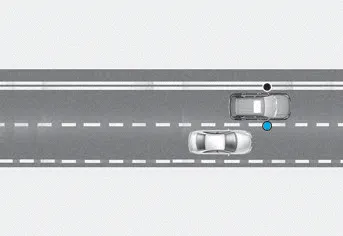
The blind spot detection range varies relative to vehicle speed.
Note that if your vehicle is traveling much faster than the vehicles around you, the warning will not occur.
2. Closing at high speed
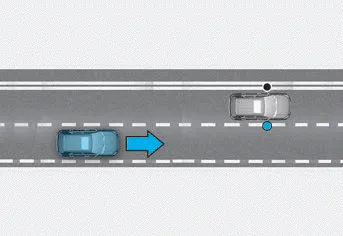
Blind-Spot Collision Warning system will alert you when it detects a vehicle is approaching in an adjacent lane at a high rate of speed. If the driver activates the turn signal when the system detects an oncoming vehicle, the system sounds an audible alert.
WARNING
- Always be aware of road conditions while driving and be alert for unexpected situations even though Blind-Spot Collision Warning system is operating.
- Blind-Spot Collision Warning system is supplemental systems to assist you. Do not entirely rely on the systems. Always pay attention, while driving, for your safety.
- Blind-Spot Collision Warning system is not a substitute for proper and safe driving. Always drive safely and use caution when changing lanes. Blind-Spot Collision Warning system may not detect every object alongside the vehicle.
• Setting Blind-Spot Safety function The driver can activate the system by placing the ignition switch to the ON position and by selecting 'User Settings → Driver Assistance → Blind- Spot Safety'.
Other information:
Hyundai Venue (QX) (2020-2026) Service Manual: Special service tools
Special Service Tools Tool (Number and name) Illustration Use 09977-3R000 Disc & hub assembly bolt remover Removal and installation of disc & hub assembly.
Hyundai Venue (QX) (2020-2026) Service Manual: Blower Resistor (Manual). Repair procedures
Inspection 1. Measure the resistance between the terminals. 2. The measured resistance is not within specification, the blower resistor must be replaced. (After removing the resistor) Replacement 1.
Categories
- Manuals Home
- Hyundai Venue Owners Manual
- Hyundai Venue Service Manual
- Vehicle Information
- Automatic Transaxle Fluid (ATF). Repair procedures
- Engine Electrical System
- New on site
- Most important about car
