
Hyundai Venue (QX): Blind-Spot Collision Warning (BCW) / System Setting
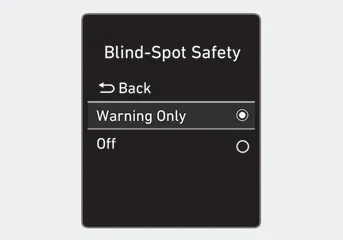
• Setting Blind-Spot Safety function The driver can activate the system by placing the ignition switch to the ON position and by selecting 'User Settings → Driver Assistance → Blind- Spot Safety'.
-- BCW turns on and gets ready to be operated when 'Warning Only' is selected.
Then, if a vehicle approaches the driver's blind spot area a warning sounds.
-- The system is deactivated and the indicator on the BCW button is extinguished
when 'Off' is selected.
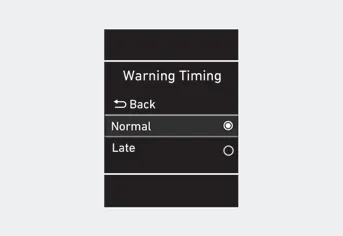
• Selecting Warning Timing
The driver can select the initial warning activation time in the User Settings in the LCD display by selecting 'User Settings → Driver Assistance → Warning Timing'.
• The options for the initial Blind- Spot Collision Warning includes the following:
-- Normal:
When this option is selected, the initial Blind-Spot Collision Warning is activated normally. If this setting feels sensitive change the option to ‘Late’.
The warning activation time may feel late if a vehicle at the side or rear abruptly accelerates.
-- Late:
Select this warning activation time when the traffic is light and you are driving in a low speed.
Information
If you change the warning timing, the warning time of other systems may change. Always be aware before changing the warning timing.
Blind-Spot Collision Warning Blind-Spot Collision Warning (BCW) system uses radar sensors in the rear bumper to monitor and warn the driver of an approaching vehicle in the driver's blind spot area.
Blind-Spot Collision Warning system Left side Right side First stage alert If a vehicle is detected within the boundary of the system, a yellow warning light will illuminate on the outer side view mirror.
Other information:
Hyundai Venue (QX) (2020-2026) Service Manual: Refrigerant Line. Repair procedures
Replacement 1. If the compressor is marginally operable, run the engine at idle speed, and let the air conditioning work for a few minutes, then shut the engine off. 2. Disconnect the negative (-) battery terminal.
Hyundai Venue (QX) (2020-2026) Service Manual: Description and operation
Description The cruise control system is engaged by the cruise "ON/OFF" main switch located on right of steering wheel column. The system has the capability to cruise, coast, accelerate and resume speed. It also has a safety interrupt, engaged upon depressing brake or shifting select lever.
Categories
- Manuals Home
- Hyundai Venue Owners Manual
- Hyundai Venue Service Manual
- Engine Mechanical System
- Warning and Indicator Lights
- Repair procedures
- New on site
- Most important about car
